
KASTURI TECHNOLOGY · BLOG
Zoapi Explained: The Video Conferencing Solution for Smarter Meeting Rooms
One device. Every platform. No more fumbling at the start of every call.
Published by Kasturi Technology · 5 min read
Every Malaysian office has had this moment. A client is sitting across the table. The call is supposed to start in two minutes. Someone is still hunting for the right cable. Someone else can't remember which laptop has Teams installed. By the time the call connects, the professionalism has already taken a hit.
It happens in boardrooms. It happens in huddle rooms. It happens in training facilities on the day of the workshop. And every time it does, it costs you — in first impressions, in wasted time, and in the quiet frustration of a team that expected the technology to just work.
Zoapi was built to stop that from happening.
What Zoapi Actually Does
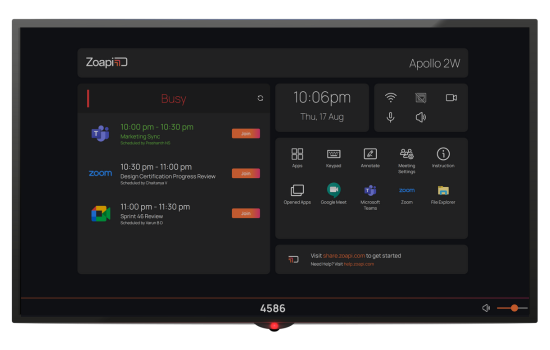
Zoapi is a video conferencing system that lives in your meeting room and connects to any platform your team — or your clients — happen to be using that day. Zoom, Microsoft Teams, Google Meet, Cisco Webex — it handles all of them from a single device. You don’t need a different gadget for each platform. You don’t need IT to reconfigure the room before every call.
You walk in, tap the screen, pick your platform, and the meeting starts. Zoapi’s own data puts the average meeting start time at under 30 seconds. In our experience installing these systems across Malaysia, that figure holds up.
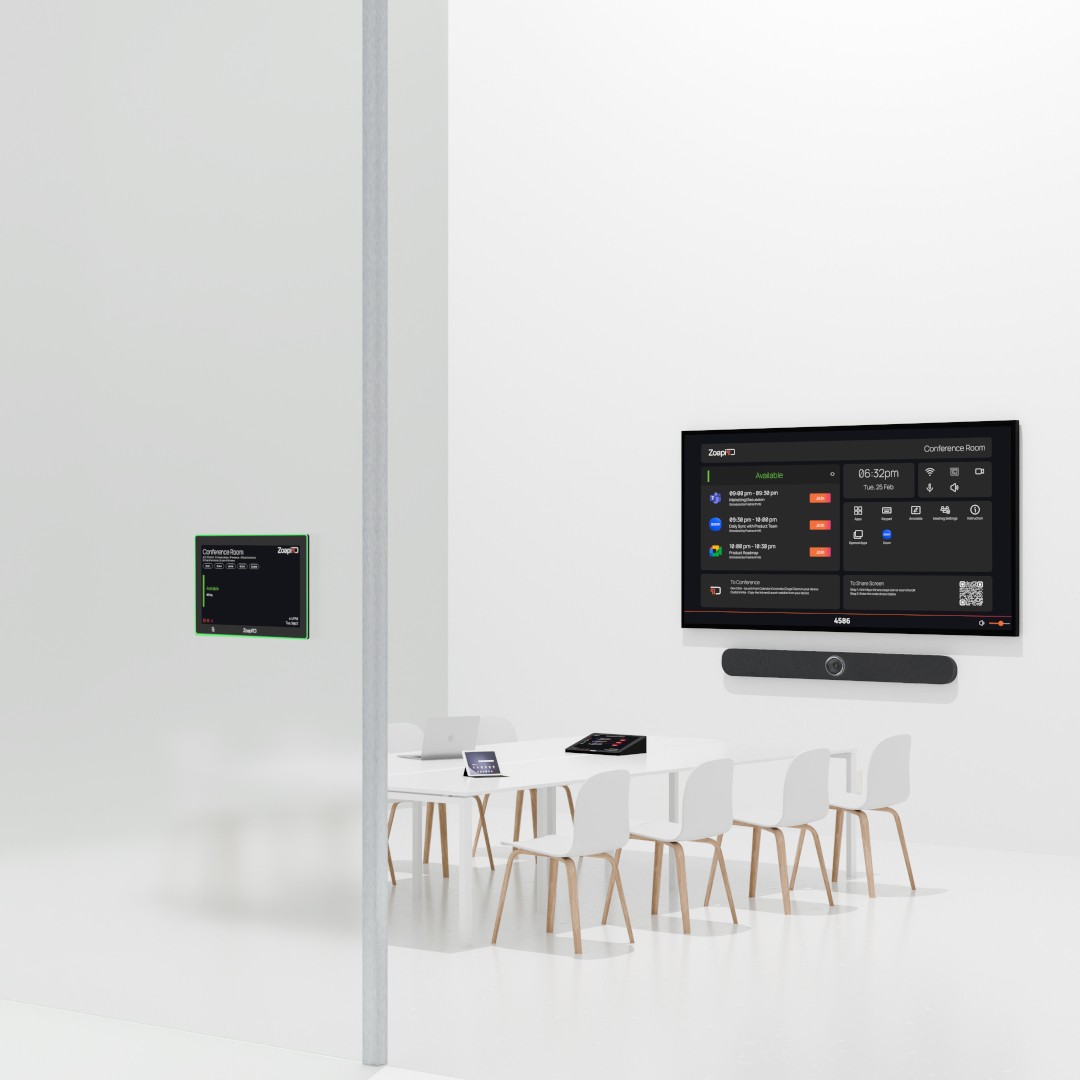
Alongside video conferencing, the Zoapi platform covers wireless screen sharing, room scheduling panels, and digital signage — so the screens in your meeting rooms are working for you even when no call is happening.
Why Platform Flexibility Matters More Than You Think
Most companies choose one video conferencing solution and assume everyone they deal with will use it too. In practice, that’s rarely how it works. Your clients run on Teams. Your regional office prefers Zoom. The consultants you’ve brought in use Google Meet.
A single-platform setup means someone always has to adapt — and adapting means downloading an app they don’t normally use, fumbling through settings they haven’t seen before, and eating into the first five minutes of a meeting that should have started on time.
Zoapi removes that friction entirely. Supporting over 20 conferencing applications, it meets people where they already are.
Where Zoapi Works Best: Three Real Scenarios
Zoapi is a strong fit for most modern office environments, but here’s how it plays out in the three room types we see most often.
Executive and Client-Facing Meeting Rooms
The boardroom is where a bad video conferencing setup costs you the most. When you're presenting to a client or joining a call with senior leadership, the technology needs to disappear into the background. Nobody in that room should be thinking about it.
Zoapi handles multiple screens, wireless presentation so presenters aren't tethered to a cable, and calendar integration so the room knows exactly what's scheduled. Consider a typical Kuala Lumpur corporate office with three meeting rooms and a mix of Zoom and Teams users — before switching to a unified video conferencing system, nearly every external call started with a five-minute setup scramble. With Zoapi, that problem is gone.
Small Rooms for Quick Collaboration
Huddle rooms are often the most neglected spaces in an office AV setup. They're used constantly, but the equipment in them is usually underpowered or outdated — a laptop balanced on a chair, a webcam from 2019, and a screen nobody can see from the back row.
Zoapi's Hub Share is built for exactly this scenario. It's a compact wireless conferencing device that turns a small room into a proper video conferencing space without the overhead of a full boardroom installation. Two or three people can share their screens, connect to a call, and get back to work in under a minute.
Larger Spaces with Remote and In-Person Participants
Training rooms have a different challenge. You often have a presenter sharing content with a room full of people while simultaneously connecting to remote participants who couldn't attend in person. The setup needs to handle both at once, reliably, without requiring a dedicated AV technician in the room.
Zoapi's Scheduler Sync panel also solves a problem that training rooms specifically tend to suffer from — the perpetually double-booked space. With a scheduling panel mounted outside the door that syncs to your Google or Office 365 calendar, everyone can see at a glance whether the room is free, when the next session starts, and how long before it wraps up.
What Makes a Meeting Room "Smart"?
The term smart meeting room gets used loosely, but there’s a meaningful difference between a room that has a big screen and a webcam bolted to the top versus one that’s actually designed around how people work.
A properly configured smart meeting room knows what meetings are coming that day. It connects to any platform without manual setup. The screens show useful information — room schedules, company announcements — when no call is active. And it gives your IT team visibility into how the room is actually being used.
That last point matters more than most buyers realise. When IT can see which rooms are over-used, which are sitting empty while teams fight over space, and where calls are failing or dropping, they can make decisions based on real data rather than office complaints. Zoapi's analytics give you that picture across your entire estate of meeting rooms.
We've been designing and installing video conferencing systems across Malaysia since 1998. In 2500+ completed projects, we've worked with most of the major platforms and devices on the market. Zoapi is one we recommend often — because it's genuinely easy for end users, not just straightforward to install.
Why We Install Zoapi
We’ve worked with a lot of video conferencing hardware over the past 26 years. What separates the equipment that gets used from the equipment that gets ignored is how quickly a non-technical person can walk into a room and get a meeting started without any help.
Zoapi clears that bar comfortably. The interface is clean, the platform switching is fast, and in our experience the connection reliability is genuinely better than most of the alternatives at a comparable price point. When something does go wrong, the remote management tools mean we can often diagnose and fix the issue without sending someone on-site.
We also carry demo units. If you want to see how Zoapi performs in a real room before committing to anything, we can arrange a live demonstration at your office or at our showroom in Petaling Jaya.
See It Working in Your Meeting Room
If your meeting rooms aren’t performing the way they should — platforms clashing, calls starting late, setup eating into every agenda — Zoapi is worth a proper look.
Or call us: +60 17 303 9377 · Mon–Fri, 9am–5pm
© 2026 Kasturi Technology Sdn Bhd · Suite 702, Block G, Phileo Damansara 1, Petaling Jaya, Selangor · www.kasturi.com.my